.svg)

.svg)
.webp)


.png)
.webp)
Risk management matters in any organization. The point is to be ready when things go wrong. ORM helps cover losses caused by weak internal controls, failed processes, or outside events that hit operations hard.
Before getting into operational risk management, it helps to look at risk management first. It’s the recognition, evaluation, and supervision of risks that can hurt capital or profits. That includes liquidity issues, legal trouble, strategic mistakes, accidents, and natural disasters.
Operational risk management sits inside that bigger picture. It deals with risks that show up in day-to-day work. Errors, tech failures, process gaps, fraud, and a few other things that can stop operations or create financial loss. This part often gets ignored until something breaks.
Operational Risk Management provides a few clear benefits:
- Proactive risk identification
- Reduction of potential risk and adverse effects that may crop up in the future.
- Enhanced decision-making processes
- Improved business efficiency
- Regulatory compliance
- Reputation protection
The first wave of ORM was mostly manual. Documents, spreadsheets, separate systems. That worked for a while, but it also brought errors, delays, and very little visibility. It doesn’t keep up well when risk starts moving faster than the process.
Nected addresses these issues with a low-code/no-code platform, a strong rules engine, and workflow management. It gives teams a simpler way to handle operational risk management without building everything from scratch.
Simplify risk management with Nected’s workflow orchestration. Try now!
Not All Operational Risk Management Tools Are the Same
Operational Risk Management solutions are not all built the same. Different organizations face different risks, different regulations, and different internal messiness. So the tool has to fit the environment, not the other way around.
Challenges with Traditional ORM Platforms
Traditional Operational Risk Management tools usually run into the same problems: rigidity, integration headaches, and not enough room to customize.
Nected takes a more flexible route with its rules engine and workflow orchestration:
1. Low-code/No-code platform: Lets non-technical teams set up and modify risk management tools without waiting on IT.
2. Customizable workflows: Helps shape risk handling around how the business actually works.
3. Advanced rules engine: Makes it possible to build more complex risk assessment logic that can change with the business.
4. Seamless integration: Connects with other enterprise apps so risk data doesn’t stay scattered.
5. Scalability: Handles growth without falling apart when data or process volume goes up.
6. Dynamic risk assessment: Keeps checking risk profiles against current rules and conditions.
7. Automated compliance monitoring: Uses rules-based checks to cut down manual review work.
8. Customizable risk taxonomies: Lets teams classify risks in a way that matches the business context.
9. Audit trail and version control: Keeps track of changes and activity for oversight and audits.
That mix helps where older tools usually stall. It also makes day-to-day risk work less clunky, which matters more than people admit.
Operational Risk Management Tools in Banks
Banks use ORM tools a little differently from other businesses. The pressure is higher. Fraud, compliance, and transaction monitoring are constant concerns, and a small gap can turn into a serious issue fast.
Fraud risk is one of the big ones. ORM tools help banks spot unusual activity, flag suspicious patterns, and route cases for review before losses grow.
Compliance risk is another area where these tools pull weight. Banks need to keep up with regulatory controls, reporting requirements, and policy checks. ORM software helps track whether those controls are actually being followed.
Transaction monitoring is usually tied to AML and fraud controls. ORM tools can surface abnormal transfers, repeated failed attempts, or activity that doesn’t fit a customer’s normal behavior.
Process failures matter too. Banking teams deal with a lot of handoffs, approvals, and system dependencies. If one step breaks, the rest can follow. ORM tools help detect those weak spots early.
Also Read: Risk Management in Banking
Common ORM Tool Capabilities
Most operational risk management tools end up doing a similar set of jobs, even if the interface looks different.
- Risk identification — finding issues before they turn into incidents.
- Incident management — logging, tracking, and resolving events when something already went wrong.
- Risk assessment — judging likelihood and impact so teams know what needs attention first.
- Control testing — checking whether controls are working or just sitting there on paper.
- Reporting dashboards — giving teams a quick view of risk trends, open issues, and overdue actions.
This is where things usually break if the tool is too rigid. The capability matters, but so does how quickly a team can actually use it.
Use Cases of Operational Risk Management Tools
ORM tools show up in a few predictable places. Not glamorous, but useful.
- Banking compliance monitoring
- Fraud detection
- Process risk monitoring
- Vendor risk assessment
- Operational incident tracking
Vendor risk is a good example. A lot of companies only look at vendors when a contract is due. That’s too late. ORM tools help keep an eye on exposure before it spills over into operations.
Top 10 Operational Risk Management Platforms
Choosing the right software is usually the hard part. The market is crowded, and a lot of tools sound the same until you try to use them. These are the top 10 operational risk management tools available today. Each one handles risk a little differently.
1. Sprinto
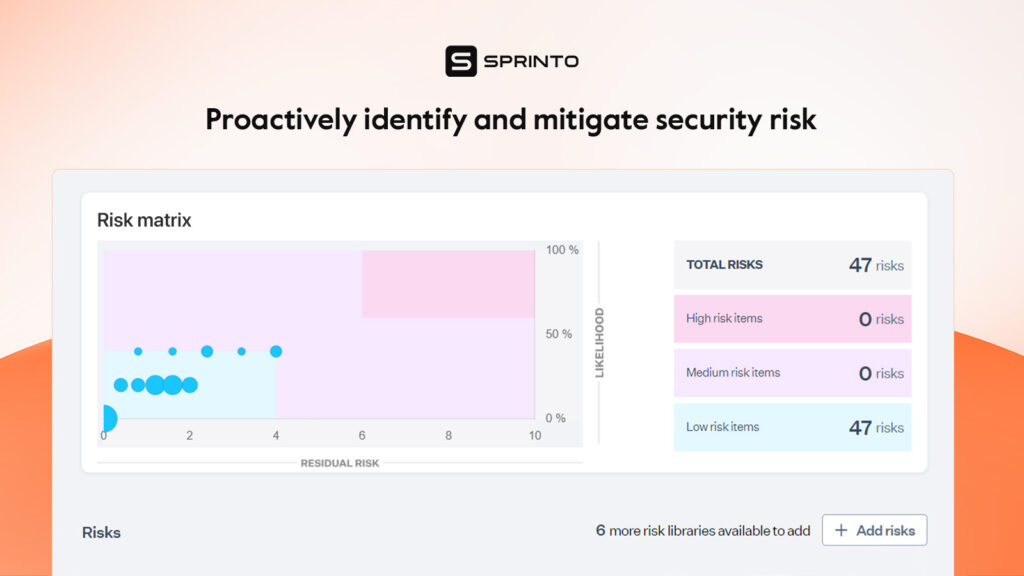
Sprinto is a cloud-based compliance automation and operational risk management tool. It helps teams map risks to controls and keep the whole thing visible. That’s useful when risk reviews start piling up and nobody wants another spreadsheet.
Key Features:
- Consolidates all risk data in a single platform for quick management review
- Launches comprehensive and updated risk assessments
- Rigorously assesses risks to understand their impact and make informed decisions
- Builds a comprehensive risk profile using a built-in risk library
- Updates risk register with custom risks and impact scores
- Automatically maps risks to compliance criteria and controls
- Provides a 360-degree view of entity-level and org-wide risks and controls
Pros:
- AI-based recommendations
- Role-based access
- Risk segregation based on criticality
- Centralized risk view, real-time insight into posture
- Prompts corrective actions
- Risk quantification, documents activities for audits
- Risk libraries, 360-degree risk overview
Cons:
- Some advanced features may be overkill for smaller organizations
Sprinto works well for teams that want a structured risk process without too much manual effort. The feature set is broad, maybe broad enough to feel heavy for smaller teams, but that’s the tradeoff.
2. Pirani
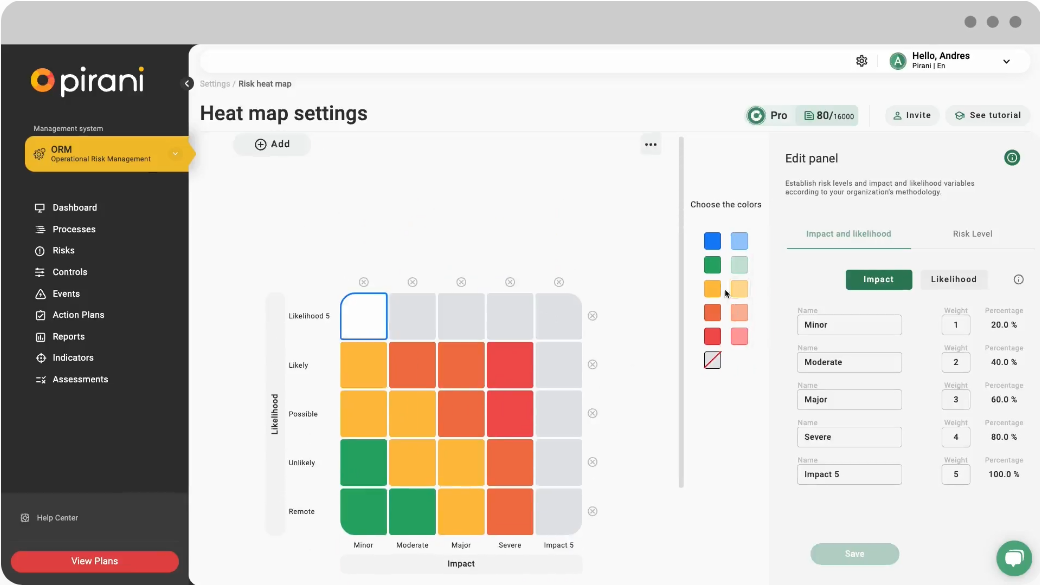
Pirani keeps things simpler. It’s an operational risk management solution that handles risk tasks and works across different standards and regulations. Useful when a business needs coverage without a ton of complexity.
Key Features:
- Manages risks to reduce operational load using indicators and generating reports
- Mobile application for managing economic, legal, or reputational risks
- Consolidates data in a single console for easy inquiries and updates
- Allows specification of custom fields to manage risks, processes, controls, or events
- Supports compliance with standards like ISO 31000, COSO ERM, Sarbanes-Oxley, and more
Pros:
- Streamlines collaboration
- Centralized risk information
- Intuitive platform
- Easy to use and highly accessible
- Supports Spanish language
Cons:
- Inadequate customization capabilities
- Generates poor quality graphs and charts
Pirani is a decent fit for teams that care more about usability and compliance coverage than deep customization. That part often gets ignored until reporting gets messy.
3. IBM OpenPages
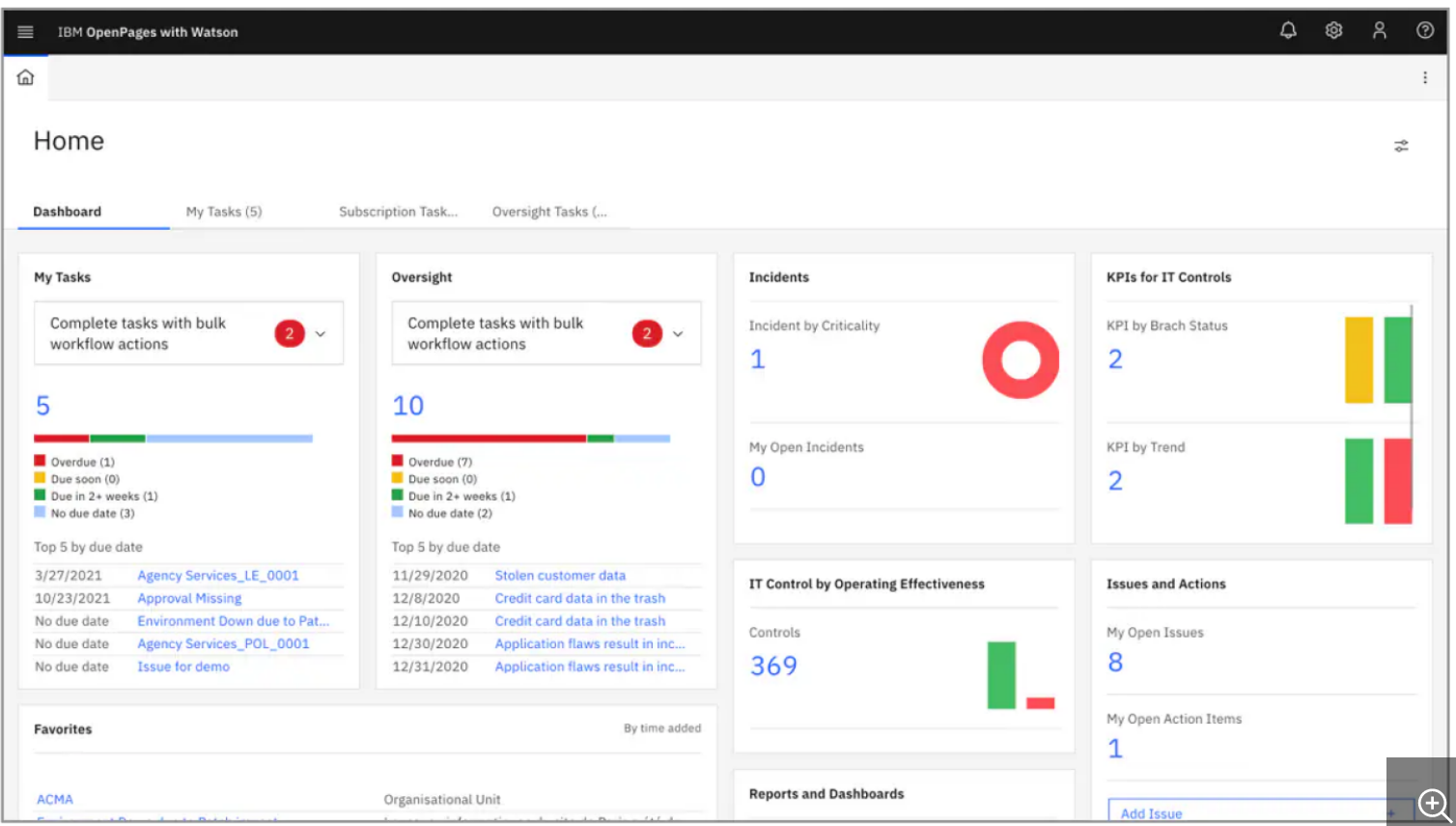
IBM OpenPages is a broader governance, risk, and compliance platform with AI-driven features. It pulls scattered risk functions into one place, which is exactly what big teams usually need after things have been split across too many systems.
Key Features:
- Task-focused user interface that simplifies complex processes and actions
- Dynamic tools like dashboards, charts, and reporting systems for deep insights
- Customizable views, visualizations, widgets, tasks, and landing pages
- Calculator engine for automatically setting values for each risk activity
- Drag-and-drop functionality for creating custom workflows
Pros:
- Powerful sentiment analysis
- Interprets complex risk issues
- Rich customer feedback analysis
- Leverages machine learning algorithms
- Effective pattern identification
- Social media sentiment analysis capabilities
Cons:
- Not budget-friendly
- Low integration support
- Access management tool is not user-friendly
IBM OpenPages is better suited to large organizations with layered risk requirements. The platform is capable, but the cost and setup friction are real.
4. LogicGate Risk Cloud
LogicGate Risk Cloud is a no-code risk management platform built to support compliance and operational risk work. It fits a range of industries, including software, fintech, banking, and healthcare. Banking teams tend to like it because the workflow logic is flexible enough to track moving controls without much engineering help.
Key Features:
- Centralizes business continuity and response strategies
- Provides a repository of business disruptions for proactive continuity strategies
- Impact analysis module for identifying risks, outage impact, and resource gaps
- Incident reporting and management system with automatic scoring and mitigation roadmaps
Pros:
- Highly customizable
- Workflow automation
- Responsive customer support
- Implements customer feedback
- Logically connects system workflow
Cons:
- Frequent glitches and bugs reported by some users
- Confusing user interface for some
LogicGate is flexible, sometimes a little too flexible if the team doesn’t have a clear process already. Still, the no-code setup makes it easier to adapt than old-school platforms.
5. Hyperproof
Hyperproof is a risk and compliance platform focused on workflow automation, audit prep, and operational risk mitigation. It maps controls to compliance requirements and keeps an eye on compliance posture in real time. That matters when teams need to prove what’s happening, not just say it’s happening.
Key Features:
- Uses standard fields to measure risk tolerance, actual risk, inherent risk, and impact
- Real-time updates of reports and dashboards
- Centralized risk register for tracking and preventing overlooked risks
- Monitors data quality across on-premise and cloud bases
- Supports multiple compliance frameworks including SOC 2, ISO 27001, NIST, GDPR, and more
Pros:
- Control reuse feature
- Strong centralized platform
- Easy control management
- Custom audit programs
- Functional tracking of control variations
- Helpful live guided feature
- Facilitates collaboration across business functions
Cons:
- Reporting system is not fully automated
- Time-consuming framework customization
- Some users report occasional bugs and unresponsiveness
Hyperproof is a solid option for organizations that need structured compliance and risk tracking in one place. It handles the basics well and avoids a lot of scattered manual work.
6. Strike Graph
Strike Graph is a compliance and operational risk management tool aimed at teams chasing security certifications and a cleaner security posture. It keeps data and progress visible across frameworks, which helps when too many people are touching the same process.
Key Features:
- Project management and tracking tools for distributed task ownership
- AI-powered tool for consolidating manual efforts and automating tasks
- Automated security questionnaires using existing control data
- Pen testing services to identify potential security risks and vulnerabilities
- Supports multiple frameworks including SOC 2, NIST, ISO 27001, HIPAA, and more
Pros:
- Supports multiple out-of-the-box frameworks
- Automated security questionnaires
- Proactive customer success team
- Strong reporting and monitoring features
- Intuitive & user-friendly UI
Cons:
- Some users report generic templates
- Limited integrations compared to some competitors
Strike Graph leans hard into certification work and security workflows. If that’s the main job, it’s a decent fit. If integration depth matters more, the limits show up pretty fast.
7. Ncontracts
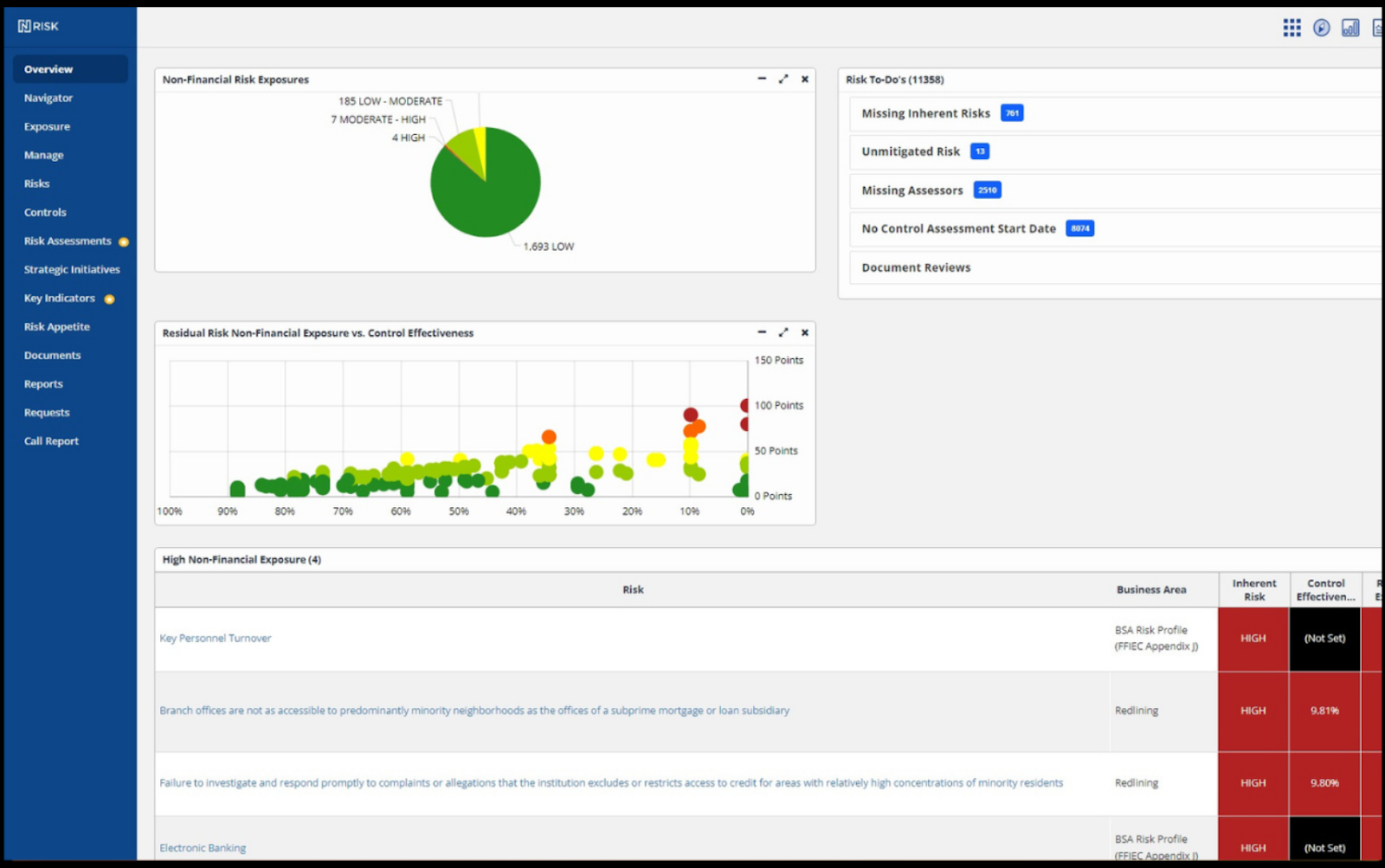
Ncontracts is a SaaS-based risk management and compliance platform built mainly for financial services companies. It gives teams a clearer view of internal and external risk, especially where vendor review and reporting matter.
Key Features:
- KRI/KPI tracking and risk heat maps for real-time risk monitoring
- Business continuity module with disaster readiness programs
- Audit finding solution for streamlining mitigation efforts
- Risk tiering model for vendor review and due diligence
Pros:
- User-friendly UI
- Proactive customer support
- Report customization capabilities
- Seamless data flow within the platform
- Reasonably priced
- Configurable workflow
Cons:
- Poor loading capacity for large data sets
- Some configurations can be cumbersome
Ncontracts works well for institutions that need finance-specific risk tools without overcomplicating the stack. Large data loads can still be a pain, so that part should be checked early.
8. Camms.Risk
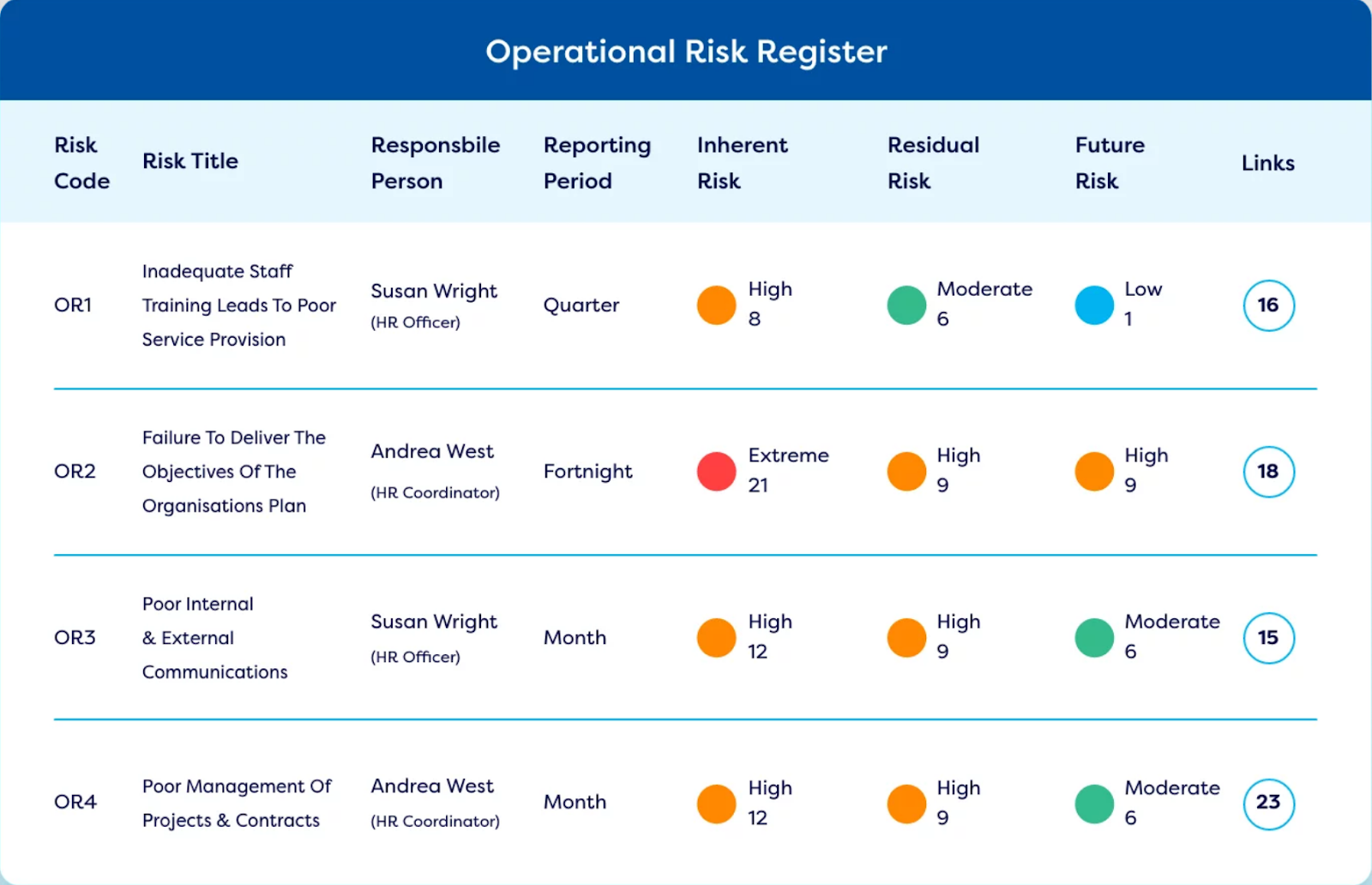
Camms.Risk, from the Camms Group, offers an integrated way to manage governance, risk, and compliance. It’s used across defense, education, finance, healthcare, and a few other sectors that don’t tolerate a lot of process drift.
Key Features:
- Customizable risk register with bow-tie visualizations
- Centralized control library linking controls to risks
- Treatment plan documentation, assignment, and tracking
- Risk categorization and reporting with access control
- Key indicator establishment and quantitative risk analysis tools
Pros:
- Strong reporting capabilities
- User-friendly interface
- Proactive customer support and onboarding
- Seamlessly connects to multiple modules
- Deep customization capabilities
Cons:
- Some complications reported in initial setup
- Challenges during configuration for some users
Camms.Risk gives teams a broad set of controls without making everything feel disconnected. Setup can be a little rough, though. That part tends to take longer than the demos suggest.
9. Resolver
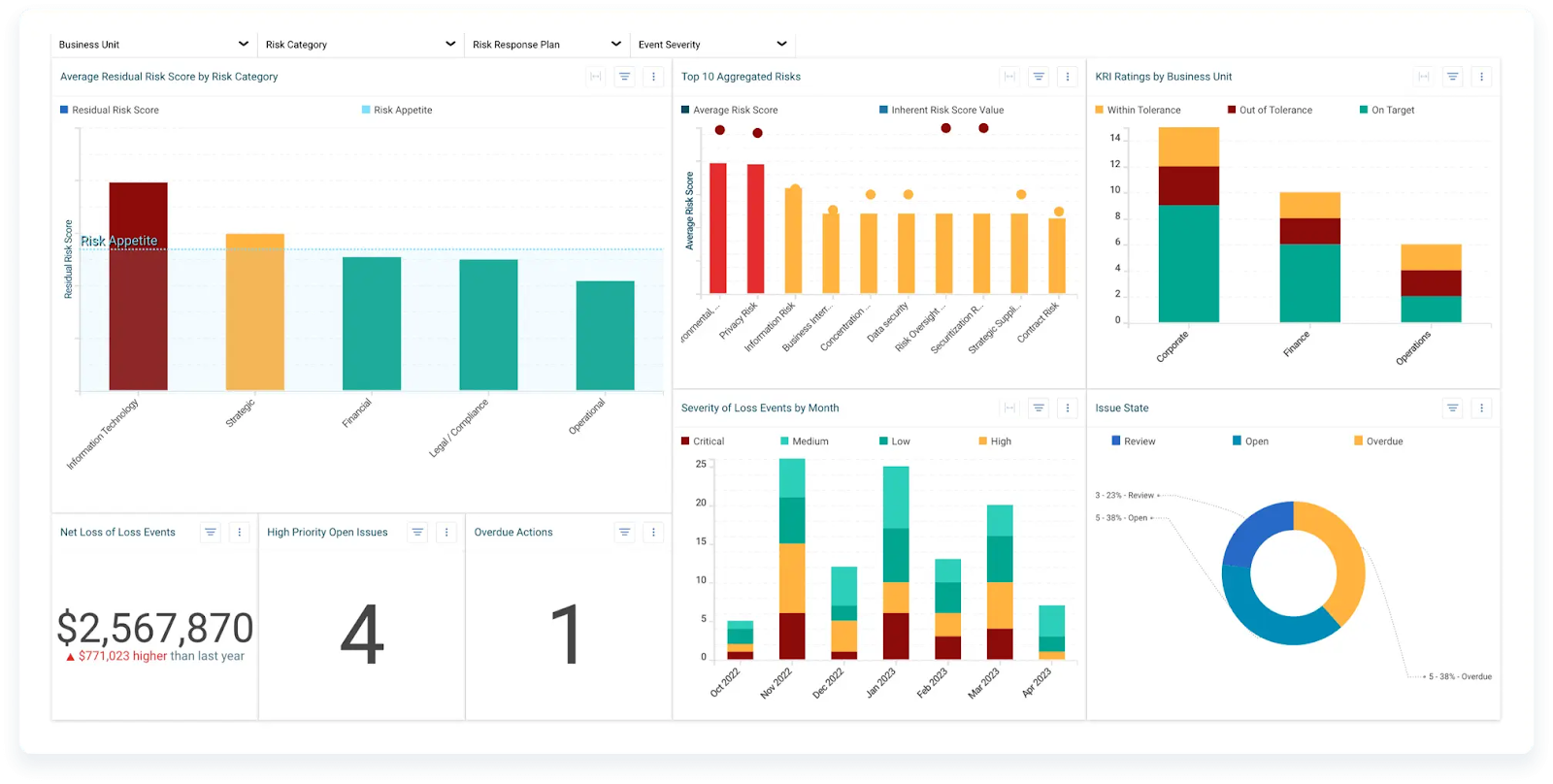
Resolver is an integrated risk management solution that automates a lot of the process work. It helps teams understand how risks connect and how controls are holding up across the business.
Key Features:
- Consolidates functions into a single platform for deep risk landscape insights
- Simple software integration to eliminate manual data transfer tasks
- Built-in risk management practices such as COSO
- Comprehensive suite of tools including dashboards, reporting functionality, and visualizations
Pros:
- Responsive customer support
- Centralized control panel
- Highly scalable
- Advanced visualization capabilities
- Automatic record submission
- Highly customizable UI
Cons:
- Limited number of integrations
- Slow implementation process reported by some users
- Some users find reporting capabilities lacking
Resolver is a good fit for teams that want more automation without losing control over the process. The downside is familiar: fewer integrations, and rollout can take time.
10. LogicManager
LogicManager is a risk management platform built to help businesses predict disruptive loss events, improve reputation, and improve performance. It cuts down on silos by pulling risks into a central console.
Key Features:
- Comprehensive risk library categorized by root cause courses
- Pre-built configurable assessment templates
- Advanced dashboard and reporting capabilities
- Automated incident management system with alerts, tasks, and reminders
- Taxonomy technology for identifying trends across incidents, departments, vendors, or applications
Pros:
- Advanced KPI and KRI monitoring
- Intelligent dashboard
- 360-degree view of controls and processes
- Risk trend identification
- Preconfigured risk library
- Highly customizable and configurable
- Advanced analytics modules
Cons:
- Limited integrations compared to some competitors
- Reporting feature has a steep learning curve for some users
LogicManager gives teams a broad set of risk features in one place. The reporting side takes a bit of getting used to, but the rest is fairly strong.
Each of these operational risk management platforms handles the problem a little differently. Some are better for compliance-heavy teams. Some lean into automation. Some are a better fit for banks or regulated companies. The main thing is matching the tool to the actual workflow, not the other way around.
Comparison of Operational Risk Management Tools
Choosing the right software is usually the hard part because the marketing all sounds exactly the same. But underneath the hood, each of these tools is highly specialized for a very specific compliance niche.
How to Choose the Best Operational Risk Management Tool
When selecting the best Operational Risk Management (ORM) tool for your organization, consider the following key factors:
- Risk Assessment Capabilities: Evaluate the tool's ability to identify, assess, and prioritize risks across various categories relevant to your business.
- Integration Capabilities: Assess how well the system integrates with your existing infrastructure, including databases, APIs, and other risk management tools.
- Customization: Look for tools that allow you to create risk management processes, workflows, and reports to your organization's specific needs.
- Reporting and Analytics: Consider the depth and flexibility of reporting features, including real-time dashboards and advanced analytics capabilities.
- Compliance Management: Make sure the tool supports relevant regulatory standards and helps streamline compliance processes.
- User Interface: A user-friendly interface can significantly impact adoption rates and effectiveness, especially for non-technical users.
- Scalability: Choose a system that can grow with your business and handle increasing difficulties over time.
- Security Features: Assess the tool's security measures, including data encryption, access controls, and audit trails.
- Vendor Support and Community: Consider the level of support provided by the vendor and the availability of community resources.
- Cost and ROI: Evaluate the total cost of ownership against the expected benefits and risk reduction.
- Modern Approaches: Look for tools like Nected for better scalability, accessibility, and automatic updates.
By carefully evaluating these factors, you can select an operational risk management tool that fits current needs and doesn’t become a headache six months later.
Conclusion
Choosing the right operational risk management tool matters if you’re dealing with a messy mix of risks, controls, and compliance tasks. The platforms above cover different needs, from AI-driven insights to heavy compliance management. If you look at integration, customization, and scalability first, the short list gets much easier.
Paired with other ORM tools, Nected becomes even more useful for handling a wider set of operational risk problems. The low-code/no-code setup, rules engine, and integrations let it slot into existing systems without too much friction. Whether the job is complex data handling, compliance automation, or real-time risk monitoring, that combination gives teams a bit more room to move.
FAQs
How do banks manage operational risk?
Banks manage operational risk by using control frameworks, monitoring tools, incident tracking, and regular risk reviews. They also lean on automated checks for fraud, compliance, and transaction activity because manual review alone misses too much.
What are ORM tools in banking?
ORM tools in banking are systems that help track operational risk across fraud, compliance, process failures, vendor exposure, and transaction monitoring. They give risk and compliance teams a way to spot issues earlier and respond faster.
Why are operational risk tools important for financial institutions?
They matter because financial institutions deal with strict regulations, high transaction volumes, and a lot of moving parts. Without proper tools, small failures turn into audit issues, losses, or worse.



.svg.webp)


.webp)